
Get Files from Directory [C#]
This example shows how to get list of file names from a directory (including subdirectories). You can filter the list by specific extension.
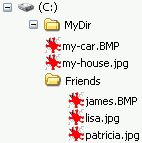
To get file names from the specified directory, use static method Directory.GetFiles. Lets have these files and subfolders in „c:\MyDir“ folder:
Get files from directory
Method Directory.GetFiles returns string array with files names (full paths).
[C#]using System.IO; string[] filePaths = Directory.GetFiles(@"c:\MyDir\"); // returns: // "c:\MyDir\my-car.BMP" // "c:\MyDir\my-house.jpg"
Get files from directory (with specified extension)
You can specify search pattern. You can use wildcard specifiers in the search pattern, e.g. „*.bmp“ to select files with the extension or „a*“ to select files beginning with letter „a“.
[C#]string[] filePaths = Directory.GetFiles(@"c:\MyDir\", "*.bmp"); // returns: // "c:\MyDir\my-car.BMP"
Get files from directory (including all subdirectories)
If you want to search also in subfolders use parameter SearchOption.AllDirectories.
[C#]string[] filePaths = Directory.GetFiles(@"c:\MyDir\", "*.bmp", SearchOption.AllDirectories); // returns: // "c:\MyDir\my-car.BMP" // "c:\MyDir\Friends\james.BMP"
Files and Folders Examples
- [C#] FileStream Open File – how to open file using file stream
- [C#] FileStream Read File – how to safely read file stream
- [C#] Read Text File – how to read lines from text file
- [C#] Load Text File to String – how to load text from file to string
- [C#] Get Files from Directory – how to get files from directory
- [C#] Delete All Files – how to delete files from the specified directory
- [C#] Get Application Directory – how to get application or assembly folder
- [C#] File Attributes – how to get or set file attributes
- [C#] Get File Time – how to get last modification time of a file
- [C#] Open File With Associated Application – how to launch the default application
See also
- Directory.GetFiles – MSDN – returns the names of files in a specified directory